

Geospatial data has become the bedrock of modern decision-making. From urban planning and environmental conservation to logistics, public health, and disaster response, the ability to visualize and analyze spatial data is critical. For years, the geospatial industry has been anchored by a classic, ongoing debate: ArcGIS vs QGIS.
On one side stands Esri’s ArcGIS Pro, the commercial titan backed by corporate infrastructure, deep enterprise integration, and a legacy of industry dominance. On the other side is QGIS, the open-source champion driven by a global community of developers, offering flexibility, zero cost, and rapid innovation.
Choosing between them isn’t merely a matter of comparing software features; it’s a choice between two distinct operational philosophies. Whether you are a GIS student, a freelance consultant, or an enterprise IT director, choosing the right platform impacts your budget, your workflow, and your data architecture.
1. The Core Philosophies: Proprietary Powerhouse vs. Open-Source Ecosystem
To truly understand the differences between ArcGIS and QGIS, you must understand their foundational philosophies.
+-----------------------------------------------------------------------+
|                             THE GIS SPECTRUM                          |
|                                                                       |
|   [ ArcGIS Pro ] <=================================> [ QGIS ]         |
|   Proprietary Ecosystem                              Open-Source Hub  |
|   - Managed & Standardized                           - Community-Led  |
|   - Commercial Licensing                             - Free & Modular |
|   - Single-Vendor Support                            - Global Network |
+-----------------------------------------------------------------------+
Esri ArcGIS: The Corporate Standard
ArcGIS is developed by Esri (Environmental Systems Research Institute), a company that has shaped the GIS industry for decades. ArcGIS Pro is the flagship desktop application, deeply integrated into a massive ecosystem that includes ArcGIS Online, ArcGIS Enterprise, and mobile field applications.
Esri operates on a proprietary model. It provides a heavily engineered, thoroughly tested, and highly standardized platform. When you buy into ArcGIS, you are not just buying a desktop app; you are investing in a structured pipeline where everything—from cloud hosting and advanced spatial analytics to field data collection—connects seamlessly out of the box.
QGIS: The Democratic Alternative
QGIS (originally Quantum GIS) is a free, open-source software project governed by the Open Source Geospatial Foundation (OSGeo). It is built and maintained by a massive, volunteer-driven community of developers, academics, and GIS professionals.

QGIS operates on a modular model. The core software is exceptionally lightweight, and its capabilities are expanded through a sprawling ecosystem of community-developed plugins. Because it is released under the GNU General Public License, anyone can download it, modify its source code, and deploy it across an infinite number of machines without spending a dime on licensing.
2. Cost and Licensing: The Elephant in the Room
The most stark and immediate differentiator between these two platforms is the financial barrier to entry.
| Feature / Metric | ArcGIS Pro | QGIS |
| Licensing Cost | High (Annual subscription per seat) | $0 (Free, Open-Source) |
| Basic Level | Restricted toolsets (Basic/Advanced tiers) | Fully unlocked out-of-the-box |
| Extensions | Paid additions (Spatial Analyst, 3D Analyst, etc.) | Free community-built plugins |
| Cross-Platform Availability | Native to Windows only | Windows, macOS, Linux, Android |
The True Cost of ArcGIS
ArcGIS Pro uses a tiered licensing system: Basic, Standard, and Advanced. A basic single-use commercial license can cost several hundred dollars a year, while an Advanced license—necessary for heavy geoprocessing, complex topology editing, and multi-user database management—costs thousands of dollars annually per user.
Furthermore, many of Esri’s most powerful capabilities are locked behind specialized extensions (e.g., Image Analyst, Network Analyst, Spatial Analyst). If your team needs advanced hydrological routing or machine learning-based image classification, your annual software bill increases significantly.
The Financial Reality of QGIS
QGIS is completely free. There are no tiers, no locked features, and no corporate paywalls. When you download QGIS, you get access to every spatial analysis tool, every file converter the community has built.
However, organizations should realize that open source can carry hidden operational costs. Without a corporate entity to handle deployment, teams must invest time or capital into training, troubleshooting, IT setup, and database integration.
3. User Interface and User Experience (UI/UX)
How a user interacts with a GIS application dictates daily productivity. Both programs approach workspace design differently.
ArcGIS Pro: The Modern Ribbon Interface
If you are familiar with Microsoft Office products, ArcGIS Pro will feel instantly recognizable. It utilizes a contextual ribbon interface, where tools and menus change dynamically based on what you are doing.
[ Project ]  [ Map ]  [ Insert ]  [ Analysis ]  [ Edit ]  [ Imagery ]  [ Share ]
+----------------------------------------------------------------------------+
|  (Geoprocessing)  (Python)  (Raster Functions)  (ModelBuilder)  [Ready Tools] |
+----------------------------------------------------------------------------+
- Context-Driven Tabs: If you select a raster layer, an “Imagery” and “Appearance” tab appears, providing relevant tools automatically.
- Unified Environment: ArcGIS Pro allows you to host multiple maps, 3D scenes, and layouts within a single project file (
.aprx), keeping your workspace highly organized.
QGIS: The Classic, Modular Workspace
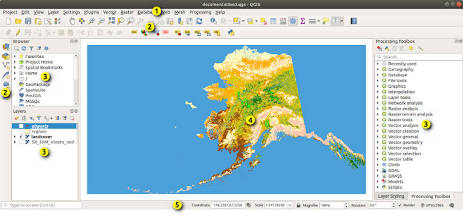
QGIS retains a more classic desktop application look, utilizing highly customizable toolbars, panels, and drop-down menus.
- Ultimate Customization: You can dock, undock, hide, or reveal almost any element of the QGIS interface. If you want a minimalist setup that only shows a layer panel and a canvas, you can easily set it up.
- The Search Bar (Ctrl+K): QGIS features a universal locator bar at the bottom left of the screen. Typing into this bar lets you instantly find layers, algorithms, features, or settings, which makes navigating the modular system extremely fast.
4. Geoprocessing, Vector, and Raster Analysis
At the core of any GIS platform is its computational muscle. Both platforms handle vector and raster calculations exceptionally well, but their internal mechanics differ.
ArcGIS Pro: Polished Toolboxes and ModelBuilder
ArcGIS Pro features an elite suite of geoprocessing tools. The platform leverages a 64-bit multi-threaded architecture and GPU acceleration, making it highly efficient at handling immense enterprise datasets.
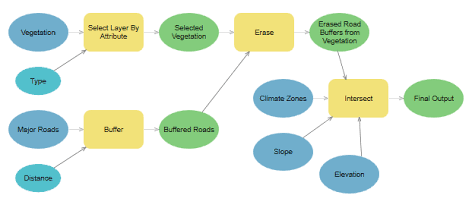
- ModelBuilder: Esri’s visual programming language allows users to string complex analytical workflows together without writing code.
- Advanced Topologies: ArcGIS Pro remains unmatched in enterprise-level vector topology rules and automated fixing mechanisms—crucial for maintaining high-accuracy utility and parcel networks.
QGIS: An Aggregate of Spatial Power
Out of the box, QGIS includes its own robust geoprocessing toolset. However, its true power comes from its role as a bridge to other legacy open-source analytical engines. The QGIS Processing Framework integrates GDAL/OGR, SAGA, and GRASS GIS directly into its interface.
               +-----------------------------+
               |   QGIS Processing Toolbox   |
               +-----------------------------+
                              |
       +----------------------+----------------------+
       |                      |                      |
+--------------+       +--------------+       +--------------+
|   GDAL/OGR   |       |  GRASS GIS   |       |   SAGA GIS   |
| (Data Magic) |       | (Topography) |       | (Hydrology)  |
+--------------+       +--------------+       +--------------+
- Format Versatility: Because QGIS is built on top of the GDAL library, it reads and writes an astonishingly wide array of vector and raster file extensions natively. It frequently handles obscure or corrupted file formats more gracefully than ArcGIS.
- Processing Speeds: Benchmark tests often show a mixed bag: QGIS can be faster at certain vector operations (like convex hulls or specific polygon intersections) because of its lightweight nature, while ArcGIS Pro often pulls ahead when processing massive, multi-gigabyte raster files and complex spatial databases.
5. Data Visualization, Cartography, and 3D
Creating visually compelling, communicative maps is an art form. Both tools provide extensive design control, though they lean into different aesthetics.
QGIS: The Cartographer’s Canvas
Many professional cartographers prefer QGIS due to its flexible, graphic-editor-like styling options.
- Advanced Symbology: QGIS offers features that resemble Adobe Photoshop, including blending modes (multiply, overlay, screen), gradient fills, drop shadows, and live feature displacement.
- Print Layouts: The QGIS print layout engine is incredibly flexible, enabling automated map production (via the Atlas tool) to generate hundreds of individualized localized maps from a single vector layer.
ArcGIS Pro: Enterprise Visualization and Immersive 3D
ArcGIS Pro provides a polished, standardized cartographic environment with high-end automated labeling systems (via the Maplex Label Engine). Where Esri completely dominates, however, is in 3D Integration.
Unlike older workflows that required jumping to a separate app like ArcScene, ArcGIS Pro allows you to convert a 2D map into a 3D scene with a single click. It natively handles massive LiDAR point clouds, complex architectural BIM (Building Information Modeling) files, and procedural city generation via Esri’s CityEngine integration.
6. The Plugin Ecosystem vs. Native Extensions
Extension management highlights the primary structural difference between commercial software and open-source models.
       [ COMPARING THE EXTENSION APPROACH ]

         ArcGIS PRO                 QGIS
     +-----------------+     +-----------------+
     |  Esri Curated   |     | Community Built |
     |  & Maintained   |     |   Open Hub     |
     +-----------------+     +-----------------+
     | - Stable        |     | - Hyper-focused |
     | - Tested        |     | - Instantly Max |
     | - Expensive     |     | - Varied QA     |
     +-----------------+     +-----------------+
The QGIS Plugin Repository
If QGIS lacks a specific feature natively, there is a high probability a community developer has built a plugin for it. The QGIS Official Plugin Repository contains thousands of free plugins.
- Need to download OpenStreetMap data with one click? Use QuickOSM.
- Want to execute advanced semi-automatic classification of satellite imagery? Download the SCP Plugin.
- This approach makes QGIS hyper-nimble, allowing individual developers to release tools addressing niche scientific or local issues instantly.
The Esri Extension Suite
Esri handles extensions via a strict, vendor-controlled methodology. Extensions are built, maintained, and rigorously QA-tested by Esri staff. While this means you will rarely experience an extension crashing due to software updates, it means you are entirely dependent on Esri’s development roadmap—and your willingness to pay for the upgrade.
7. Cloud Integration, Web GIS, and Collaboration
Modern GIS workflows are shifting rapidly away from isolated desktop computers and moving toward cloud-connected, collaborative web ecosystems.
ArcGIS: The Seamless Enterprise Cloud
This is Esri’s defining advantage. The integration between ArcGIS Pro, ArcGIS Online, and ArcGIS Enterprise creates an incredibly powerful pipeline for teams.
- Analyze: Run spatial analyses on your desktop within ArcGIS Pro.
- Publish: Publish the results directly to ArcGIS Online as an interactive web layer with two clicks.
- Collect: Field workers instantly view those layers on their mobile devices via the ArcGIS Field Maps app, collect data on the ground, and sync it back to your enterprise database in real time.
For large corporations, utility networks, and government agencies, this fully integrated ecosystem is invaluable.
QGIS: The Modular Cloud
QGIS does not have a native, single-vendor cloud environment. Instead, it serves as a highly flexible control center that you can hook into various web and database architectures.
- Database Kings: QGIS integrates perfectly with spatial databases like PostGIS/PostgreSQL. Many organizations use a combination of PostGIS for data storage and QGIS for desktop manipulation.
- Web Mapping Solutions: To publish maps to the web, QGIS users rely on tools like QGIS Server, Lizmap, or third-party web GIS extensions (such as the Felt or Mergin Maps ecosystem for field data collection). While this architecture is highly cost-effective and completely customizable, it requires distinct server administration skills to set up and maintain.
8. Automation, Scripting, and Future Tech (AI)
Automation is crucial for handling large volumes of repetitive spatial work. Both platforms have adopted Python as their primary scripting engine, though they deploy it through different libraries.
- ArcGIS Pro and ArcPy: Esri relies on ArcPy, a robust, proprietary Python site package. ArcPy allows you to control every facet of ArcGIS Pro, from running geoprocessing models to automating print layouts. Additionally, Esri has built-in deep learning tools and turnkey AI models within their Living Atlas, allowing users to execute object detection on aerial imagery without deep coding experience.
- QGIS and PyQGIS: QGIS features PyQGIS, an open Python API that grants full access to the application’s underlying code framework. Because it is completely open source, you can use PyQGIS to write custom plugins, automate data processing, or run headless QGIS scripts on external servers without any licensing restrictions. QGIS has also seen rapid integration of community-developed AI plugins for open-source AI image segmentation models like SAM (Segment Anything).
9. Career Marketability and Community Support
If you are a professional or looking to enter the job market, you must consider which software holds more weight on your resume.
The Employment Market
Historically, Esri has maintained a firm grip on corporate, defense, and government hiring pipelines. Most job descriptions for traditional GIS Analysts or Spatial Database Administrators explicitly list experience with ArcGIS Pro as a core requirement. If your goal is to work for a local municipality, a state agency, or a major defense contractor, knowing the Esri ecosystem is practically mandatory.
The Rise of Open-Source Roles
However, the landscape is shifting. Non-profits, international NGOs, research academic facilities, and tech startups are heavily favoring QGIS. These organizations value developers and data scientists who understand spatial concepts without being reliant on expensive corporate software. Experience with QGIS—especially combined with skills in PostGIS, Python, and SQL—makes you highly attractive to modern, agile tech teams.
Summary Verdict: Which One Should You Choose?
The debate between ArcGIS Pro and QGIS is not about finding a universal winner; it is about selecting the right tool for your specific environment.
Choose ArcGIS Pro if:
- You work within a large enterprise or government institution that already has an Esri infrastructure.
- You require a turn-key cloud and mobile deployment system for field data collection and public dashboards.
- Your day-to-day work requires heavy, advanced 3D modeling, BIM integration, or complex network topology editing.
- You want dedicated, reliable corporate technical support and formalized training pipelines.
Choose QGIS if:
- You are an individual consultant, startup, non-profit, or small business where commercial software licensing fees are prohibitive.
- You operate in a cross-platform environment (Mac, Linux, Windows) or require a lightweight, highly transportable desktop client.
- You want complete control over your software architecture, custom plugins, and underlying code without vendor lock-in.
- You plan to build a spatial data pipeline around open-source database technologies like PostgreSQL/PostGIS.
In many modern geospatial teams, professionals choose not to split the difference—they use both. They utilize QGIS for its unparalleled format flexibility, data cleaning agility, and database connections, while maintaining ArcGIS Pro licenses for enterprise distribution and final production delivery. Experiment with both to see which environment fits your workflow best.